Windows, under command
Launch apps, inspect running processes, find and move files, interact with windows and run commands through a tool-driven workflow.
Explore capability ↗Meet MRCO AI — an agentic desktop companion built to turn natural language into momentum. Research the web, work with files, orchestrate Windows tasks, explore code, build knowledge and analyze markets from one intelligent command center.
MRCO AI connects language models to real tools—so ideas can move beyond the chat window and into the work itself.
Launch apps, inspect running processes, find and move files, interact with windows and run commands through a tool-driven workflow.
Explore capability ↗Draft code, create project files, run your installed toolchain and review command output in a repeatable development workflow.
Explore capability ↗Search for information, fetch readable web pages, open a real browser and turn findings into structured notes and reports.
Explore capability ↗Read supported documents, index folders, search by meaning, keep useful memory and turn know-how into reusable skills.
Explore capability ↗Use speech-to-text, spoken replies and optional screen vision to move between voice, visible UI and natural-language instructions.
Explore capability ↗Review crypto charts and order-book data, run AI market analysis, scan setups and evaluate strategies with historical backtests.
Explore capability ↗MRCO AI brings the conversation closer to your actual work. It can route a request to the right tools, gather context, execute supported steps and return results for review—all from one desktop interface.
Choose cloud capability, local execution, or a coordinated blend of models to fit the task, hardware, privacy requirements and connectivity.
Connect compatible providers and models through configurable endpoints. Test models and choose a primary provider for your workflow.
Bring multiple eligible model workers into the same problem, split complex tasks when enabled and synthesize responses through a primary model.
Run supported GGUF text models locally through the llama.cpp runtime, with GPU offload where compatible hardware allows it.
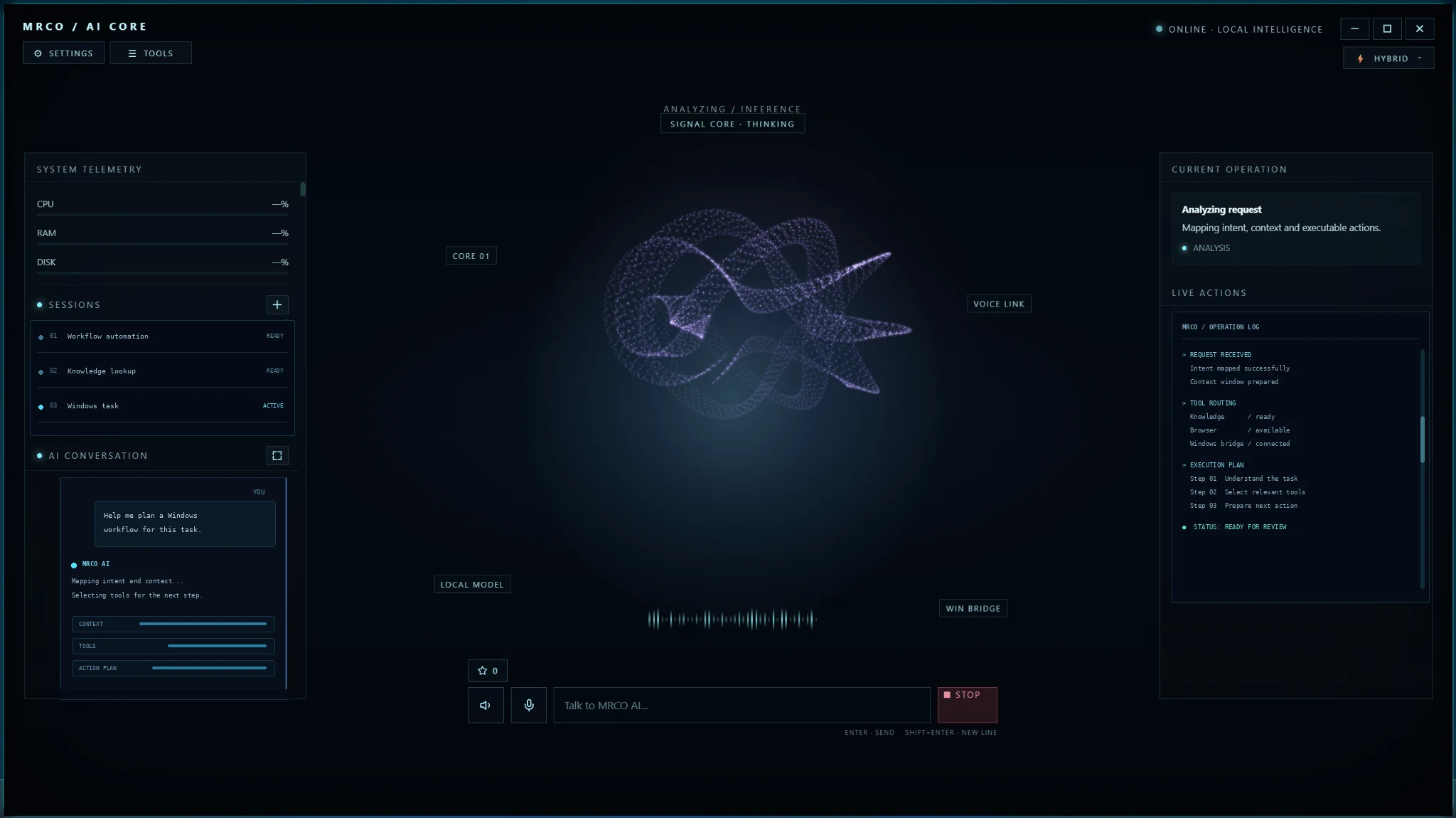
Explore the same Core layout used by the Windows agent: telemetry, conversation sessions, animated intelligence core, model mode, current operation and execution log.
This website embeds your supplied interface files for a more faithful visual preview. The public preview is illustrative; actual Windows, file, browser and tool actions run through the installed desktop host.
Add specialist instructions, retain useful knowledge, and connect custom tools as your workflows evolve.
Shape specialist workflows with reusable Markdown instructions, global rules and custom extensions.
Explore capability ↗Collect documents, pages and notes, then retrieve relevant passages instead of starting from zero every time.
Explore capability ↗Use historical tests to evaluate strategies, then save extracted rules as a skill for future context.
Explore capability ↗Go beyond code suggestions. MRCO AI can work through an application workflow using project files, Windows execution tools and the development toolchain available on your PC.
Generate project structure and source files, update existing code, call installed compilers or runtimes and run build commands to produce an application.
Explore development workflows ↗Inspect failed command output and logs, reason about the likely cause, attempt a correction and rerun the relevant build or test step—then report what passed and what still needs attention.
How the execution loop works ↗Check whether a dependency or utility is available and use supported installation tools where the environment, network and permissions allow it.
Explore optional components ↗Yes — MRCO AI can create applications and test them. It can write and edit project files, run supported build and test commands, inspect errors, attempt fixes and repeat checks. Successful results depend on the selected model, installed toolchain, test coverage, permissions and project requirements.
Use the browser, configured endpoints and custom tools to extend the agent toward your own services and infrastructure.
Research public profiles and posts, organize social content, summarize activity and automate supported browser tasks through a configured session or approved integration.
Explore social integrations ↗Connect suitable API endpoints or trusted custom scripts to inspect services, organize server files, review logs, run maintenance commands and support deployment workflows.
Explore server workflows ↗Planned improvements include a phone companion, better cross-device handoff and a richer library of guided integrations.
Explore the roadmap ↗